Inventoros records products, warehouse balances and the movements that change them. It is self-hosted inventory tracking software with an AGPL-3.0 licence and no core item or user caps. Start with a receipt, a transfer and an order you can reconcile before importing the full catalogue.
The stock number needs a clear meaning. In Inventoros, creating an order deducts stock immediately. Shipping happens later in the operational workflow. Staff and integrations need to understand that boundary so the same order does not reduce stock a second time.
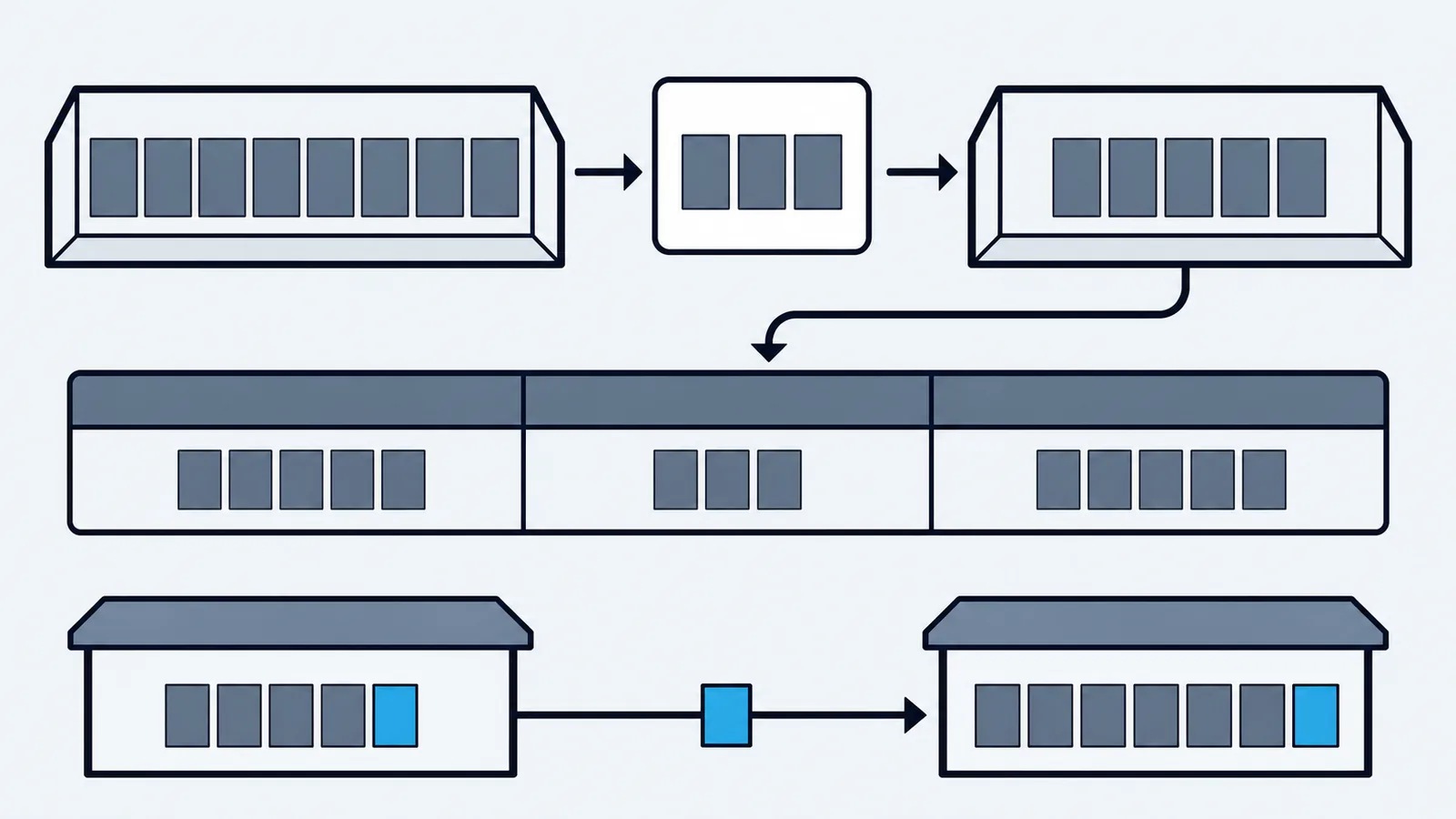
Track products and the places holding them
Give each product a stable identifier and decide how variants differ. Color, size or pack quantity can make two items operationally different even when their names look alike. Count and receive the actual variant rather than putting every quantity on a parent product and trying to separate it later.
Warehouses and storage locations answer different questions. A warehouse defines a stock balance for a site or stockholding operation. A location tells staff where to find the goods. Keep those assignments consistent with the physical labels used during receiving and counts.
The Locations screen shows storage cards, location codes and a QR-label action. The cropped example below excludes account and user details. Establish codes staff can recognize and put the corresponding labels where goods are actually stored.
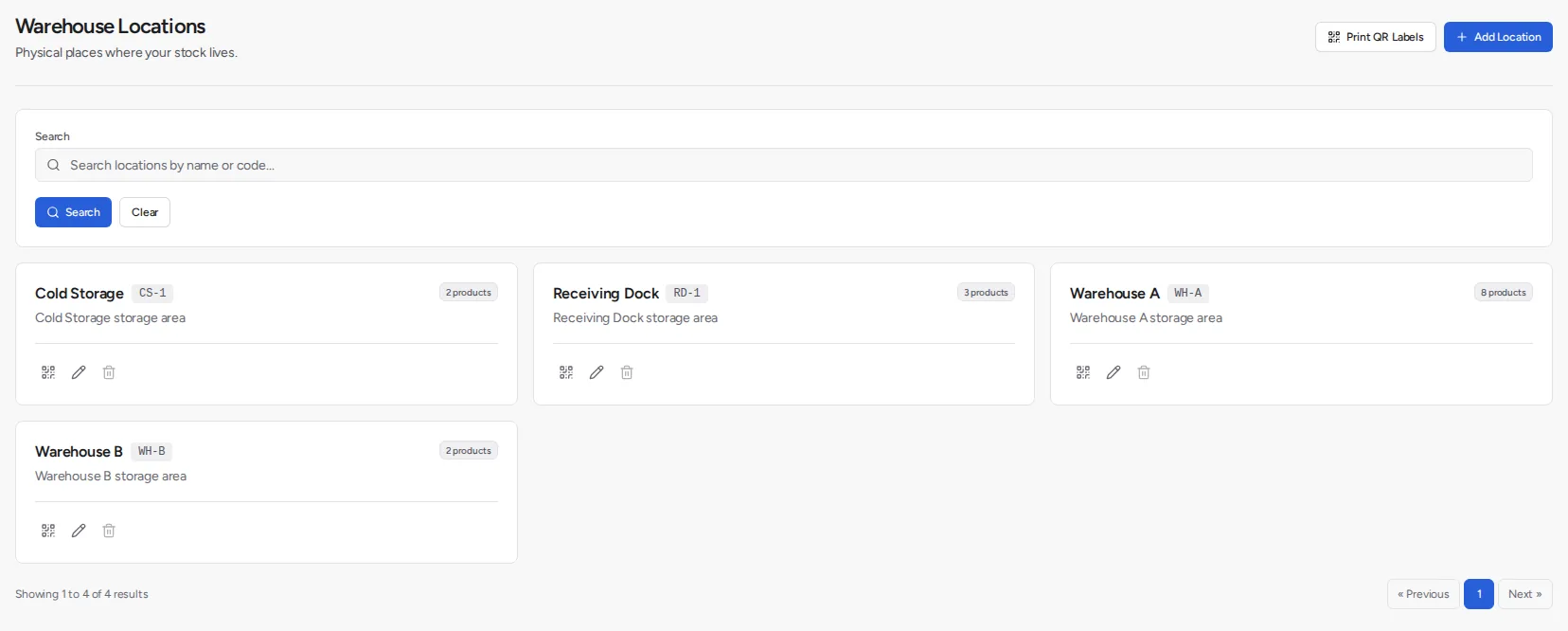
Avoid using a location name as an informal note for a temporary move. Record the movement through the appropriate stock operation. Otherwise an office user can see one balance while the person at the shelf is looking in the wrong place.
What changes the recorded balance
| Event | Effect to establish |
|---|---|
| Purchase receipt | Received quantities enter recorded stock |
| Sales order creation | Ordered quantities deduct immediately |
| Warehouse transfer | Source and destination quantities change; total is conserved |
| Adjustment | An explicit correction changes the selected stock |
| Stock audit | Count workflow records and reconciles discrepancies |
| Plugin reservation | A separate hold affects the reservation/availability view |
An ordinary order is not a reservation waiting for shipment to deduct stock. Keep the two concepts separate when connecting an outside storefront or interpreting an availability field. A plugin hold also needs a clear release or consumption rule in the integration that creates it.
Use a narrow pilot to establish the sequence. A successful integration request is only one part of the test; inspect the inventory result and the operational record it created. Repeat the request in a controlled environment to check that the integration does not create the same order twice.
Reconcile one product through a working day
Consider a hypothetical product with eighty recorded units in warehouse A and twenty in B. Receive thirty into A, transfer fifteen from A to B, and create an order for twelve units from B. Assume no other transactions or plugin holds.
Opening total                      80 + 20        = 100
Receipt into A                     80 + 30        = 110 in A
Transfer out of A                 110 - 15        = 95 in A
Transfer into B                    20 + 15        = 35 in B
Order creation in B                35 - 12        = 23 in B
Closing recorded total             95 + 23        = 118
Independent total                 100 + 30 - 12   = 118
The transfer changes where stock is recorded, while the receipt and order change the total. Compare both warehouse balances and the independent calculation. A correct total alone cannot reveal goods recorded against the wrong warehouse.
If the twelve ordered units have not physically left B, the physical count can still be thirty-five. The recorded balance has already deducted the order. Account for the goods awaiting dispatch during reconciliation; do not create another deduction just to make the shipment appear in the workflow.
Once the twelve units leave, the remaining physical count is twenty-three in B. The pilot should show this timing clearly enough that warehouse staff and an integration developer describe it the same way.
Review a count discrepancy before correcting it
When the shelf count differs from the recorded quantity, identify the transaction boundary before entering an adjustment. An order awaiting dispatch, a receipt recorded against another warehouse or an unrecorded transfer can explain a difference without any goods being lost.
Have a second person recount the affected product and confirm the unit being counted. Compare the same product, variant and warehouse at the same time. A count taken before a receipt and compared with a balance taken after it will disagree even when both are accurate.
Document the reason for a correction and restrict who can make it. Repeatedly changing the quantity to match a shelf hides the process failure if the real cause is an integration creating duplicate orders. Review recurring discrepancies by cause and repair that workflow as well as the individual balance.
Connect purchasing to actual receipts
A purchase order represents requested supply. It should not increase stock merely because the buyer sent it. Record the quantities that actually arrive and inspect the outstanding amount after a partial delivery.
Inventoros supports partial purchase receiving. Only a draft purchase order can be edited. A partly received purchase order cannot be cancelled, and there is no close-short action for an undelivered remainder. Landed cost and supplier-invoice matching are outside that purchasing flow.
Those boundaries matter when a supplier substitutes a product or cancels a remainder. Define the exception procedure with the buyer before adopting the workflow. The purchase order guide follows the states and receiving behavior in more detail.
Keep units consistent between purchasing and inventory. If a supplier sells cartons and the warehouse counts individual units, document the conversion used when recording the receipt. A carton label and a product barcode can refer to different quantities.
Read current data through the API
The REST API exposes product records with stock and availability fields. This read-only request obtains a page of products from your installation:
curl --get "$INVENTOROS_URL/api/v1/products" \
  --header "Authorization: Bearer $INVENTOROS_TOKEN" \
  --header "Accept: application/json" \
  --data-urlencode "per_page=100" \
  --data-urlencode "page=1"
Use the required product-reading permission and follow the pagination metadata. A hundred returned records can be only the first page. Keep the token outside public configuration and give integrations the permissions they need.
Inventoros also provides MCP access to inventory operations and a GraphQL surface covering a subset of REST. Choose the interface for the exact operation, then test permissions, pagination and failure handling. The API documentation and MCP documentation describe those interfaces.
A stock snapshot does not explain every historical movement. Reconcile orders, receipts and transfers when investigating a difference, and keep outside systems from silently replacing the stock record with an older cached value.
Set reorder thresholds at the right scope
Reorder points are available per product and per warehouse. A threshold for the whole business and a threshold for one warehouse should not be treated as interchangeable. A location can run short even while another site holds excess stock.
For a hypothetical warehouse using six units per day with an eight-day lead time and a chosen twelve-unit buffer, the threshold is 6 × 8 + 12 = 60 units. This is the buyer's planning calculation. Review it when demand, supplier timing or the buffer assumption changes.
Inventoros does not provide built-in demand forecasting or a dedicated safety-stock field. Keep that calculation in a separate planning process when required. The forecasting guide shows a reproducible baseline and an error test; the reorder point formula explains the timing arithmetic.
Choose a product that matches the floor process
I would choose Inventoros when the business needs product records, purchasing, recorded stock, locations and transfers, and has someone to operate a self-hosted application. It fits a team that wants its inventory data and integration under its own control.
Do not choose it when the essential requirement is task-directed warehouse picking: the core does not provide pick lists, picking waves or zones. A warehouse execution product with the required workflow can cost less than developing and maintaining that missing process. The warehouse software comparison helps define the pilot around that distinction.
Barcode tools can help identify the correct record, but the operating process still determines when a receipt or move is recorded. Start with the barcode inventory setup and test the labels actually used on your products and shelves.
Start on a test server
The application requires PHP 8.4.1 or later. The documented Linux installer needs at least 1 GB of RAM, with 2 GB recommended, and provisions a Docker-based deployment. On a dedicated test server:
curl -fsSL https://inventoros.com/install.sh -o install.sh
less install.sh
sudo bash install.sh
Follow the Linux installation instructions for the supported environment. Import a small catalogue and run the receipt, transfer and order example with your own identifiers. Confirm staff permissions, export a sample and restore a backup before putting the system in charge of live stock.
The core licence is free, but hosting, backups, mail delivery and maintenance require a budget. Compare that total with a managed product and include the operator's time. A free licence is useful only when the full workflow and operating arrangement fit the business.
Prices and requirements as of November 2026.