Purchase Order Software: The Five States, a Worked PO and a Free Workflow
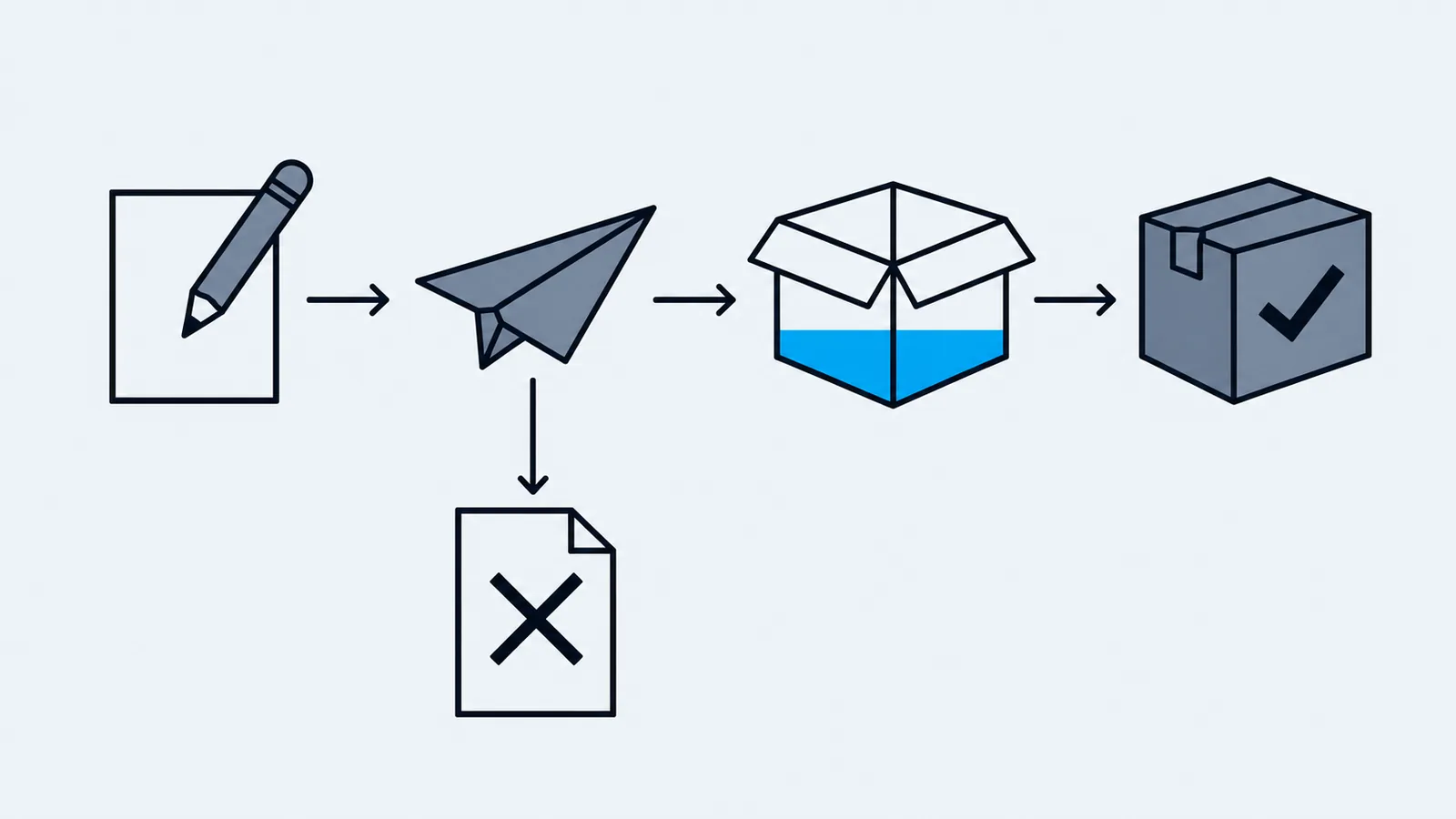
Most purchasing mistakes come from not knowing what state a purchase order is in. You reorder something that is already on a truck. You chase a supplier for an order you never sent. You pay an invoice for goods that haven't arrived. All of them are state problems, and a PO only has five states.
The five states
- Draft. You're building it. Nothing has gone to the supplier and stock isn't affected. You can change anything.
- Sent. The supplier has it. The stock is now on order, which matters when you decide whether to reorder.
- Partial. Some of it has arrived. Suppliers split shipments, so this is normal, and one missing line shouldn't hold up the rest.
- Received. Everything arrived and was counted into stock.
- Cancelled. The order was withdrawn.
A sent PO is stock you can count on. A PO that has sat in partial for three weeks is a supplier you need to call.
A worked example: one PO, two deliveries
You order three items from one supplier.
PO-1048 (sent)
Line  Item          Ordered   Unit cost   Line total
1     Laptop stand      40      $21.00      $840.00
2     Webcam            20      $34.00      $680.00
3     USB-C dock        10      $62.00      $620.00
                                  Total  $2,140.00
The first delivery brings 40 stands and 12 webcams. You receive them against the PO:
Received so far: 40 stands, 12 webcams, 0 docks
Status: partial
Still to come:   8 webcams, 10 docks
Value received:  $840 + $408 = $1,248.00 of $2,140.00
The status moves to partial by itself, and the 8 webcams and 10 docks are still on order. Check open POs before you raise another order, or you can buy them twice.
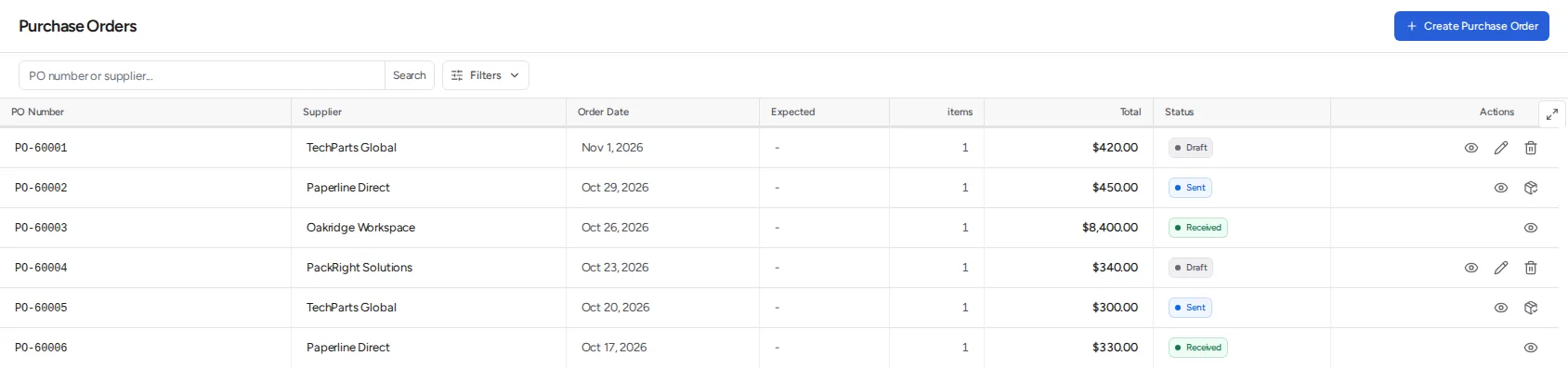
The PO list below is from Inventoros. A draft has an edit and a delete button. A sent order has a receive button. A received one is read-only.
What to check in purchase order software
The basics: supplier records with contacts, a PO with lines, quantities, unit costs and totals, a status with a history, receiving against the PO line by line including partial receipts, and a PDF you can send or an email button.
Then the things that save time:
- Supplier price history, so you can see what you paid last time and spot creep.
- Approvals, so an order over a set value needs a second person.
- Draft POs generated from reorder points, so low stock turns into an order and not a spreadsheet row.
- Landed cost, if freight and duties matter to your margins. See landed cost.
- An API or webhooks, so purchasing can feed your accounting system.
Match the PO, the receipt and the invoice
Before you pay, three documents should agree on quantity and price: the PO (what you ordered), the receipt (what arrived) and the supplier's invoice (what they're charging). This catches two common problems, being billed for items that haven't arrived and being billed a price that differs from the PO. Purchase order vs invoice covers the check in detail.
A free workflow you can copy
If you're starting from a spreadsheet, this is enough:
- One supplier per PO. It keeps receiving simple.
- Number every PO in sequence, like PO-1048, and never reuse a number.
- Set a reorder point per item and raise a draft PO when stock crosses it. The reorder point formula shows the maths.
- Send the PO and record the date, so you can see which are overdue.
- Receive against the PO, not from memory. Count each line and record partial quantities.
- Check price and quantity against the invoice before you pay.
- Review open POs weekly, and call about anything sent and past its expected date.
A spreadsheet stops working around the point where you have several suppliers and more than one person ordering.
How Inventoros handles it
Inventoros uses exactly these five states. Only a draft can be edited. A sent PO can be received against or cancelled, and a PO that has been partly received can't be cancelled. It becomes received when every line has been received in full.
That last rule has a consequence: there's no "close short" action. If a supplier tells you the docks in the example are discontinued, PO-1048 stays partial, because ten docks never arrive. That's a gap, and if it matters to you, plan around it.
What it does cover:
- Emailing the PO to the supplier as a PDF.
- Supplier price history and 1 to 5 supplier ratings.
- Approvals that trigger by order value.
- Draft POs generated from reorder points, one per primary supplier. Products with no primary supplier, and variant products, are skipped.
- Camera scanning in the receiving screen, which adds one to the received quantity for each scan.
Inventoros doesn't calculate landed cost and doesn't match supplier invoices. The invoice PDF it produces is a PDF of the PO. You compare the PO and the received quantities with the supplier's invoice yourself.
Over the API, the REST API covers the whole purchasing flow, including send, cancel and submit for approval. GraphQL covers only creating, updating and receiving a PO. Webhooks fire on purchase_order.created, purchase_order.received and purchase_order.cancelled. Details are in the API docs.
It's free, open source and self-hosted. The installation guide gets a server running with one command.
FAQ
What is purchase order software? Software that creates purchase orders, sends them to suppliers, tracks their status and records what arrives against them. Better tools connect it to stock levels and reorder rules, so low stock becomes an order without retyping.
Do I need purchase order software, or is a spreadsheet enough? A spreadsheet is fine for one supplier and a few orders a month. With several suppliers, partial deliveries or more than one person ordering, it gets hard to see what's on order and what's late.
What's the difference between a purchase order and an invoice? A PO is your request to buy, made before delivery. An invoice is the supplier's request for payment, made after. Compare both with the receipt before you pay.
Can a purchase order be changed after it's sent? Usually only by agreement with the supplier. In Inventoros only drafts are editable, so a change to a sent order means cancelling it and raising a new one.