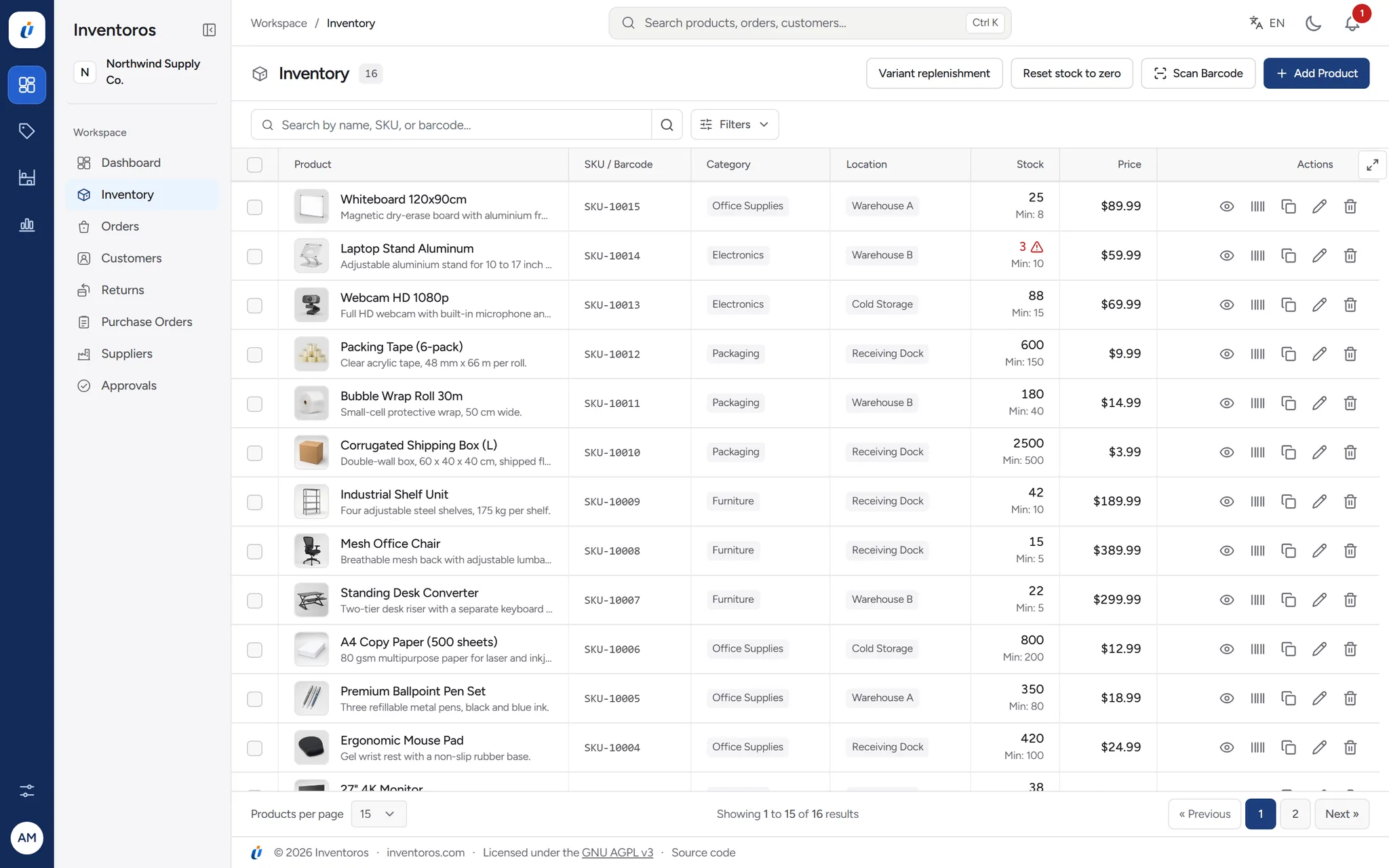
What inventory control means day to day
Inventory control is three jobs. The number in the system has to match the shelf, only the right people can change that number, and there should be enough stock to sell without paying for stock that sits. Each job needs a record: who moved what, when and why, so a short count can be traced instead of guessed at.
In Inventoros, stock changes through a small set of recorded movements. A purchase order receipt adds stock. Creating a sales order takes it off, and a received return can put it back. A transfer moves it between warehouses or bins without changing the total. Anything else is a stock adjustment, and every one of those carries a type, a reason, the quantity before and after, and the user who made it.
Stock adjustments, reasons and approvals
An adjustment has one of six types: manual, recount, damage, loss, return or correction, plus a written reason that cannot be left blank. The Stock adjustments list filters by type, product, user and date, so a run of losses on one product or from one person stands out. The inventory shrinkage guide covers what to look for.
Approvals are off until an organization turns them on. For stock adjustments, set a quantity threshold, a value threshold, both, or neither to hold every manual adjustment. A held adjustment does not touch stock until someone with the approve stock adjustments permission accepts it. Nobody decides on their own request, unless an administrator is allowed to self-approve, which is the default and can be switched off. Stock transfers have the same switch.
Cycle counts and stock audits
A stock audit records the system quantity for each line when it starts, then the counted quantity and the difference. Count a whole warehouse or one storage location as a full count, a cycle count or a spot check, scanning items with a keyboard-style scanner or a camera. Completing the audit turns each difference into a recount adjustment, so the correction sits in the same ledger as every other movement.
Cycle count schedules run daily, weekly or monthly and cover everything, one warehouse, one location or one category. Each run creates a draft audit for a set number of products, picking the ones counted least recently, so repeated runs rotate through the whole range. When variance approval is on, a supervisor approves each difference or asks for a recount with a note, and the audit cannot be completed until every variance is reviewed. A counter cannot approve their own count, again unless an administrator is allowed to self-approve.
The cycle counting guide explains how to choose what to count and how often, and the inventory record accuracy guide shows how to measure the result.
Lots, serials and expiry dates
Batch-tracked products hold stock in batches with a lot number, a manufacture date and an expiry date. Orders take the batch that expires first. Serial-tracked products keep a status per serial number: available, reserved, sold, damaged, written off, transferred or consumed. The batch expiry report lists batches that expire within 7, 30 or 90 days, or have already expired. See lot and batch tracking for setting this up.
Reorder points, replenishment and low-stock alerts
Each product has a reorder point, reorder quantity, minimum and maximum, and each warehouse can have its own, so a branch running short is caught while the main site still has plenty. Every morning a scheduled check finds products at or below their reorder point and creates draft purchase orders, one per primary supplier, skipping products already on an open purchase order. Variants can have their own policy per warehouse: a reorder point, a target level, a minimum order quantity and an order multiple, counting what is already on open purchase orders. Inventoros drafts that purchase order on request, or each morning when the policy is set to reorder automatically.
When a product's stock falls to its minimum, users who manage stock get an in-app notification and an email, unless they have turned low-stock alerts off, and a low-stock webhook fires for anything else you connect. A warehouse that falls to its own minimum raises an in-app notification for the stock managers who can access that warehouse. Inventoros does not forecast demand and has no safety stock field. Work those numbers out with the reorder point formula and the safety stock formula, then enter the result as the reorder point.
Valuation and inventory reports
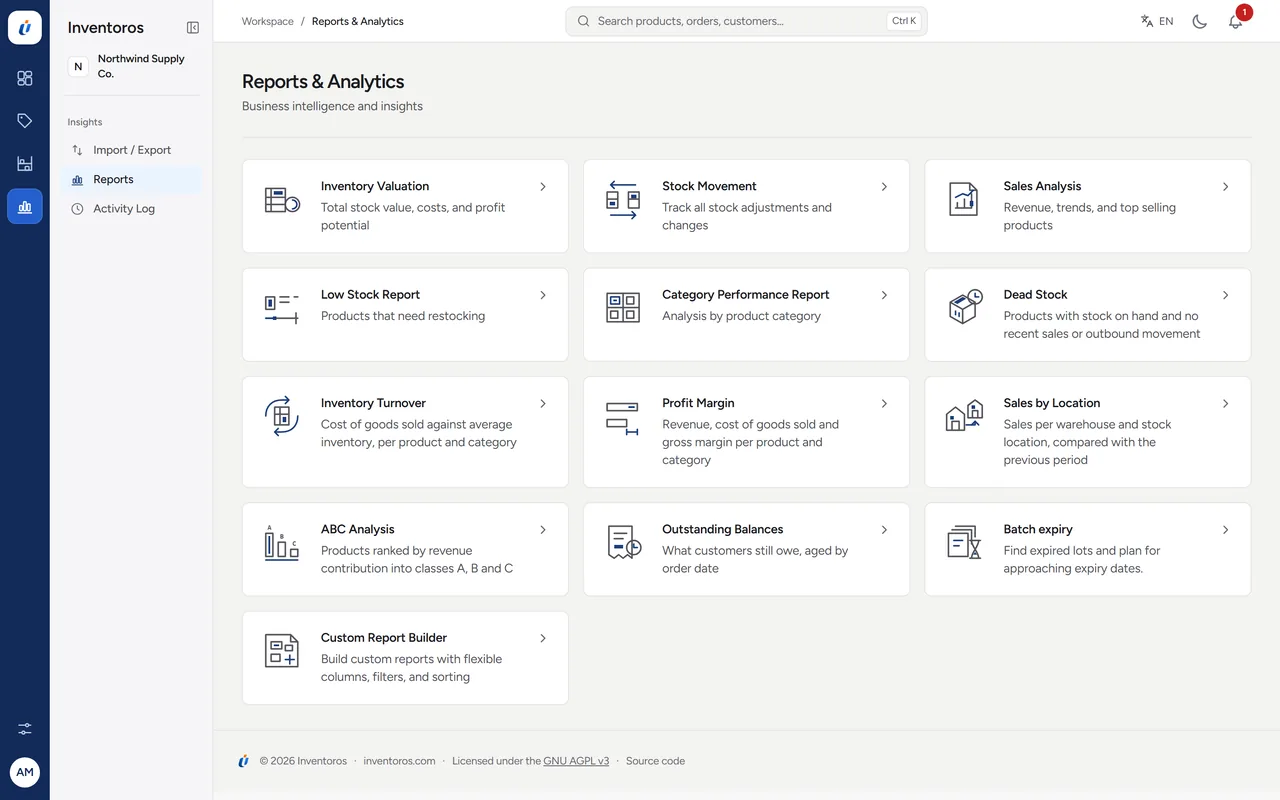
Stock is valued at each product's purchase price, with variants at their own price and cost. The inventory valuation report shows cost value, retail value and the difference, by product and by location. Inventoros keeps no FIFO or average cost layers; the inventory valuation methods guide explains what those would change.
- Inventory turnover divides cost of goods sold, using the unit cost recorded on each order line when it sold, by average inventory value, per product or per category. See inventory turnover ratio.
- ABC analysis ranks products by revenue: the top 80% is class A, the next 15% class B and the rest class C. See ABC analysis.
- Dead stock lists products with stock on hand and no sale, no outbound movement, or neither, in the last 30, 60, 90 or 180 days. See dead stock.
- Stock movement lists every adjustment in a date range, filtered by type.
There are also low stock, sales, profit margin and sales by location reports and a custom report builder. Reports export to CSV, Excel or PDF, and can be emailed on a schedule.
Permissions and the activity log
Roles are built from individual permissions, such as manage stock, transfer stock, approve stock adjustments and manage stock audits, and you can create your own roles. Users assigned to particular warehouses only see and change stock in those warehouses, unless their role has access to all of them. The activity log records changes with the user, time and details, filters by user, category, action and date, and exports to CSV or Excel.
When to choose something else
Inventoros has no general ledger, no FIFO or average costing and no connection to an accounting package, so cost of goods for your books comes from elsewhere. It does not forecast demand, there is no native mobile app (staff use the web app in a phone browser, with camera scanning), and it does not direct warehouse work with putaway rules or wave picking. If you need costing layers posted to the books, or a distribution centre run on handheld tasks, choose an ERP or an enterprise WMS. If you need accurate stock across a few sites, controlled changes and regular counts, and someone who can run a Laravel application, Inventoros fits.
For a side-by-side look at other tools, see the comparison pages. The inventory tracking software page walks through a stock reconciliation, and the warehouse management software page covers bins, receiving and pick lists.
Try it on a test server
The licence is free; budget for the server, backups, mail delivery and the time to apply updates. The one-command Linux installer sets up a Docker stack and needs 1 GB of memory, with 2 GB recommended. The application needs PHP 8.4.1 or later.
curl -fsSL https://inventoros.com/install.sh -o install.sh
less install.sh
sudo bash install.sh
Import a small catalogue from CSV, set reorder points on a few products, then run one adjustment and one cycle count before moving live stock.
Features as of Inventoros 2.8, November 2026.