What syncs, and in which direction
| Data | Direction | Details |
|---|---|---|
| Orders | Shopify to Inventoros | On by default. Orders placed before your start date are skipped, and so are test orders unless you turn them on. |
| Cancellations | Shopify to Inventoros | Cancels the Inventoros order and restocks it once. |
| Stock levels | Inventoros to Shopify (default), or Shopify to Inventoros | One owner per store. Shopify levels arrive as audited correction adjustments. |
| Product names and prices | Shopify to Inventoros (default), or Inventoros to Shopify | Shopify prices are copied in only when both sides use the same currency. |
| Descriptions, images, options, SEO | Not synced | They stay in Shopify. |
| Fulfilments, tracking, refunds | Not synced in 1.0.2 | Fulfil and refund the order in Shopify as well. |
When Inventoros owns stock, Shopify's own inventory updates are recorded and not applied. When Shopify owns it, Inventoros never pushes stock back, so the two cannot echo each other.
Which warehouse stock Shopify shows
Under Mappings, each Shopify location points at one Inventoros warehouse or at All stock. A warehouse location gets the product's stock in that warehouse's bins. All stock sends the total across every warehouse, which suits a store with one Shopify location selling everything you hold. A store with one location and an organization with one warehouse are mapped to each other automatically.
One location is primary. When it maps to a warehouse, imported orders are placed in that warehouse, so their units come from its bins first. Variant stock is pushed to the primary location only, and so is the stock of a product that has no bins. Negative stock is sent as 0.
When Inventoros owns stock, every stock change triggers a push for mapped products: adjustments, orders, receipts, transfers, returns, counts and imports. Ten changes to one product before the push leave one push, and Shopify receives the current quantity as an absolute number. There is no safety-buffer setting in Inventoros or the plugin, so Shopify sees the full quantity of each mapped location. The multi-location inventory guide covers how to split stock between sites.
How Shopify orders arrive
An imported order goes through the same order service as one typed into Inventoros. Stock comes off at once, units leave their bins, serials are allocated and the order fires the usual events, so Inventoros webhooks and other plugins see it. It carries the Shopify order id and a reference that is unique within the organization, which keeps one Inventoros order per Shopify order whatever order the webhooks arrive in.
Two things stop an import: a line whose Shopify variant is not mapped, and not enough stock in Inventoros. Nothing changes, the sync history names the SKU or the shortage, and you press Retry once it is fixed. Lines without a Shopify variant, such as custom items and tips, are left out with a warning.
A new connection imports orders placed on or after the day you connect. Shopify's read_orders scope covers the last 60 days, so importing older orders also needs read_all_orders.
Webhooks and the 15-minute sync
Once the connection test passes, the plugin subscribes to seven Shopify webhook topics: order created, updated and cancelled, product created and updated, inventory level updated, and app uninstalled. A delivery must carry a valid HMAC signature made with your app's secret and come from the connected shop. It is stored once and processed in a background job, and no Inventoros request waits on Shopify.
Shopify delivers webhooks only to a public https address. On a local or plain http install nothing is registered, and the scheduled sync every 15 minutes picks up product and order changes instead. Public installs run the same sync as a safety net.
Throttling and outages become retries. The plugin respects Shopify's Retry-After header and query cost limit, retries server errors after 15 seconds, 1 minute, 4 minutes and 15 minutes, and pauses a store for 15 minutes after five failures in a row, doubling up to 4 hours. Work that still fails waits under Activity until you retry or dismiss it.
SKU matching before anything syncs
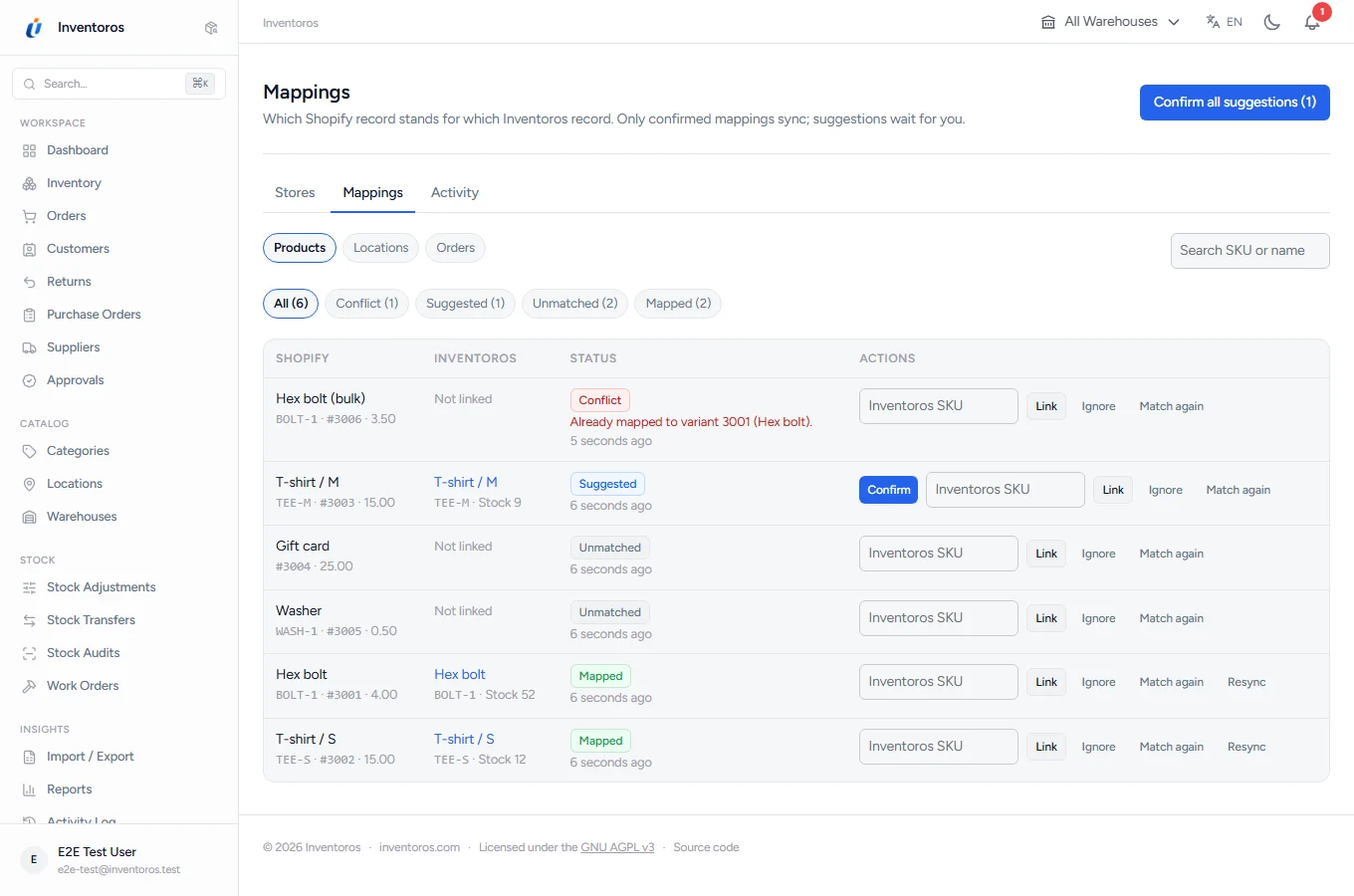
A full sync reads locations, products, stock and orders, then lists every Shopify variant on the Mappings page. When exactly one Inventoros product or variant has the same SKU, the row is a suggestion. A variant with no SKU or no match is unmatched, and a SKU shared by several records is a conflict. Confirm suggestions one at a time or all at once. Until then nothing syncs for that product. The SKU system guide helps if your SKUs need cleaning up first.
Install the plugin and connect a store
- Run a current Inventoros release on PHP 8.4 or later, with the queue worker and scheduler running. The one-command Linux installer sets up a Docker stack that runs both.
- In Inventoros, open Plugins, switch to the Marketplace tab and choose Install and activate on Shopify. The package signature is checked before anything is installed. You can also sign in and download the ZIP from the Shopify listing, then upload it on the Plugins page if your server allows plugin uploads.
- In the Shopify admin, create a custom app with the scopes
read_products,write_products,read_inventory,write_inventory,read_locationsandread_orders, and install it on the store. - In Inventoros, open Shopify, choose Connect a store and paste the app's Admin API access token and API secret key. Pick who owns stock and who owns products. Both credentials are stored encrypted and a connection test runs in the background.
- Map Shopify locations to warehouses, run a full sync and confirm the SKU suggestions.
Installing needs the Manage Plugins permission. Connecting a store and changing mappings need the plugin's shopify.manage permission.
When to choose something else
If you want to manage stock inside the Shopify admin, use Shopify's own inventory tools or an app from the Shopify App Store. This plugin connects through a custom app you create, and the daily work happens in Inventoros on your own server. Version 1.0.2 does not send fulfilments, tracking or refunds back to Shopify, and only the primary location receives variant quantities, which matters if you sell variants from several Shopify locations. Official plugins for WooCommerce, Amazon and ShipStation are listed as coming soon, so if you need several sales channels synced today, pick a multi-channel tool.
Choose Inventoros with the Shopify plugin when Shopify is your main channel, the stock sits in your own warehouses with bins, purchase orders and counts, and someone can run a Laravel application.
Inventory management software for ecommerce beyond Shopify
The ecommerce inventory management guide explains available stock, channel buffers and the three ways to sync a store. For channels without a plugin, Inventoros imports orders and products from CSV, and the REST API, GraphQL API and signed webhooks cover products, stock and orders. The warehouse side is on the warehouse management software page.
Plugin features as of Shopify plugin 1.0.2 on Inventoros 2.8, November 2026. Shopify is a trademark of Shopify Inc. The plugin is built by the Inventoros team and is not affiliated with or endorsed by Shopify Inc.